Web research
Compare websites and get answers that cite every page ChatGPT inspected.
“Compare the pricing pages of these three tools and cite the pages you inspect.”

The CloudBrowser plugin lets ChatGPT open real Chrome browsers in the cloud — to research websites, extract data, fill in forms and check user journeys — with a browser-sessions workspace right beside your conversation.
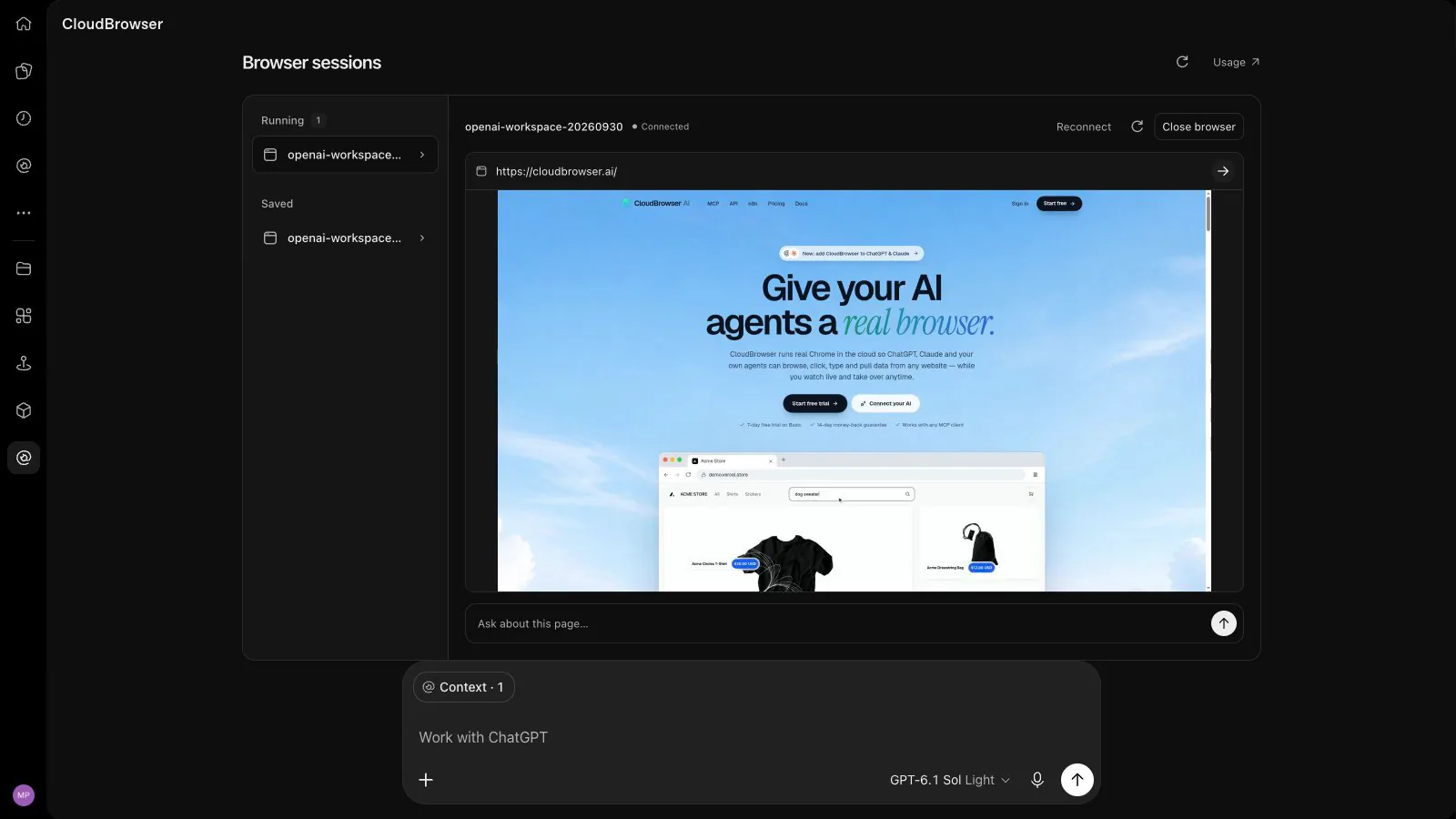
Screen recording of the CloudBrowser plugin inside ChatGPT. A saved browser session is resumed in the Browser sessions workspace and cloudbrowser.ai loads in it. A question typed in the workspace’s “Ask about this page” box is sent to ChatGPT, which reads the page through CloudBrowser and answers with a one-sentence summary. The browser is then closed and can be resumed again.
Five browser skills
The plugin ships five focused skills, so ChatGPT knows when to open a browser, what to look at, what to bring back — and when to close it.
Compare websites and get answers that cite every page ChatGPT inspected.
“Compare the pricing pages of these three tools and cite the pages you inspect.”
Turn listings, directories and tables into structured data with source links.
“Extract the first 20 listings on this page into a table with source links.”
Fill in forms and move through multi-step flows, then verify the result.
“Fill in this contact form with the details below and confirm it was sent.”
Walk through a user journey and capture anything that looks broken.
“Check our signup journey on staging and capture any visible problems.”
See running browsers, resume a saved login and close browsers when you finish.
“Show my sessions, resume my saved login, then close the browser when we finish.”
Every skill runs in an isolated Chrome browser in the cloud with stealth fingerprints and a premium proxy — so JavaScript-heavy sites work the way they do for people.
See all 20 browser toolsBrowser sessions workspace
Open the CloudBrowser workspace from the chat. It shows what each browser is doing and lets you steer — without leaving ChatGPT. Opening or refreshing it never starts a browser.
How it works
Open the plugin directory in ChatGPT and search for CloudBrowser. The listing is coming soon.
Sign in with your CloudBrowser account and approve browser control. New here? Start with a 7-day free trial.
Mention CloudBrowser in a chat or pick it from the + menu, then describe the task in plain words.
Check the answer and the page in the workspace. Close the browser — or keep the session for next time.
Human in the loop
ChatGPT never needs your passwords. When a site asks for a login, a one-time code or a CAPTCHA, open the live remote desktop from your CloudBrowser dashboard, step in yourself and save the session. Next time, ChatGPT resumes it already signed in.
detect_captcha tells ChatGPT when a human is neededSecurity & privacy
The plugin connects ChatGPT to your CloudBrowser account with scoped, revocable access. What the browser reads is returned to ChatGPT only when you ask for it.
Connect with your CloudBrowser account through OAuth with PKCE. ChatGPT never sees your password or your API token.
The plugin asks for browser control, plus your email address if you approve it — nothing else in your account.
Access tokens expire after 10 minutes and refresh tokens rotate on every use. A grant lasts up to 30 days.
Disconnect ChatGPT under Connected assistants in your dashboard. Revoking stops further tool calls.
Each browser runs in its own container, separated from your other sessions and from every other customer.
Each tool declares whether it only reads or can change something, so ChatGPT can confirm before it acts.
Read the privacy policy and the terms of service.
Pricing
The plugin costs nothing to install and adds no AI charge — ChatGPT does the thinking on your ChatGPT plan. Browser time comes from your CloudBrowser plan.
| Plan | Price | Browser time | Browsers at once |
|---|---|---|---|
| Basic | $25/mo · 7-day free trial | 250 h (30,000 units) | 10 |
| Premium | $90/mo | 1,000 h (120,000 units) | 25 |
| Custom | Let’s talk | Custom | Custom |
Available today
The plugin runs on CloudBrowser’s hosted MCP server — and you can already add that server to ChatGPT in developer mode.
CloudBrowser with the server URL below.https://mcp.cloudbrowser.aiDeveloper mode is a ChatGPT beta for eligible paid plans on the web; in Business workspaces an admin sets it up. Menu names vary between ChatGPT releases. Setup guides for Claude, Cursor, VS Code and more.
The plugin has been submitted to OpenAI and is in review. As soon as it is listed in ChatGPT’s plugin directory, the install link will appear on this page. Until then, you can connect the same CloudBrowser server in ChatGPT developer mode.
It gives ChatGPT real Chrome browsers in the cloud and five skills: web research with cited pages, web data extraction, website actions such as filling in forms, website checks and browser-session management. A workspace beside the chat lists your running browsers and saved sessions and shows the current page.
CloudBrowser gives ChatGPT a browser that lives in your own CloudBrowser account. It can resume your saved, signed-in sessions, keep running between turns, be watched and taken over on a live remote desktop, and be used from the API, MCP clients and SDKs as well.
No. You connect your CloudBrowser account through OAuth, and you never type website passwords into the chat. When a site needs a login, open the live remote desktop from your CloudBrowser dashboard, sign in yourself and save the session — ChatGPT can then resume it.
Plugin availability is set by OpenAI and can depend on your ChatGPT plan, workspace settings and region. In Business and Enterprise workspaces, an admin may need to allow the plugin first.
Installing the plugin is free. Browser time is billed through your CloudBrowser plan: one usage unit is 30 seconds of browser time per tab. Basic is $25 a month with a 7-day free trial, and Premium is $90 a month.
The workspace shows a screenshot of the current page that you can refresh at any time. For a live, interactive view, open the remote desktop for that browser from your CloudBrowser dashboard.
Closing the workspace or disconnecting the plugin does not close running browsers. Close them from the workspace, ask ChatGPT, or use the dashboard. Idle browsers also close on their own after their timeout — 180 seconds for a resumed session.
A saved session stores cookies and local storage under a label in your CloudBrowser account, so a resumed browser comes back signed in. Open tabs are not restored. You can remove saved sessions at any time.
Yes. The plugin uses your CloudBrowser account, so the same browsers and saved sessions are available from Claude, Cursor and other MCP clients, the browser API and the SDKs.
Revoke the connection under Connected assistants in your CloudBrowser dashboard, or remove the plugin in ChatGPT. Revoking stops further tool calls; close any running browsers separately.
Start a 7-day free trial now, connect ChatGPT in developer mode today — and install the plugin as soon as it is listed.